Create, approve, and sign
documents in one system

Templates in Word. Processes in FluForm. From draft to signature — fully transparent and under control.

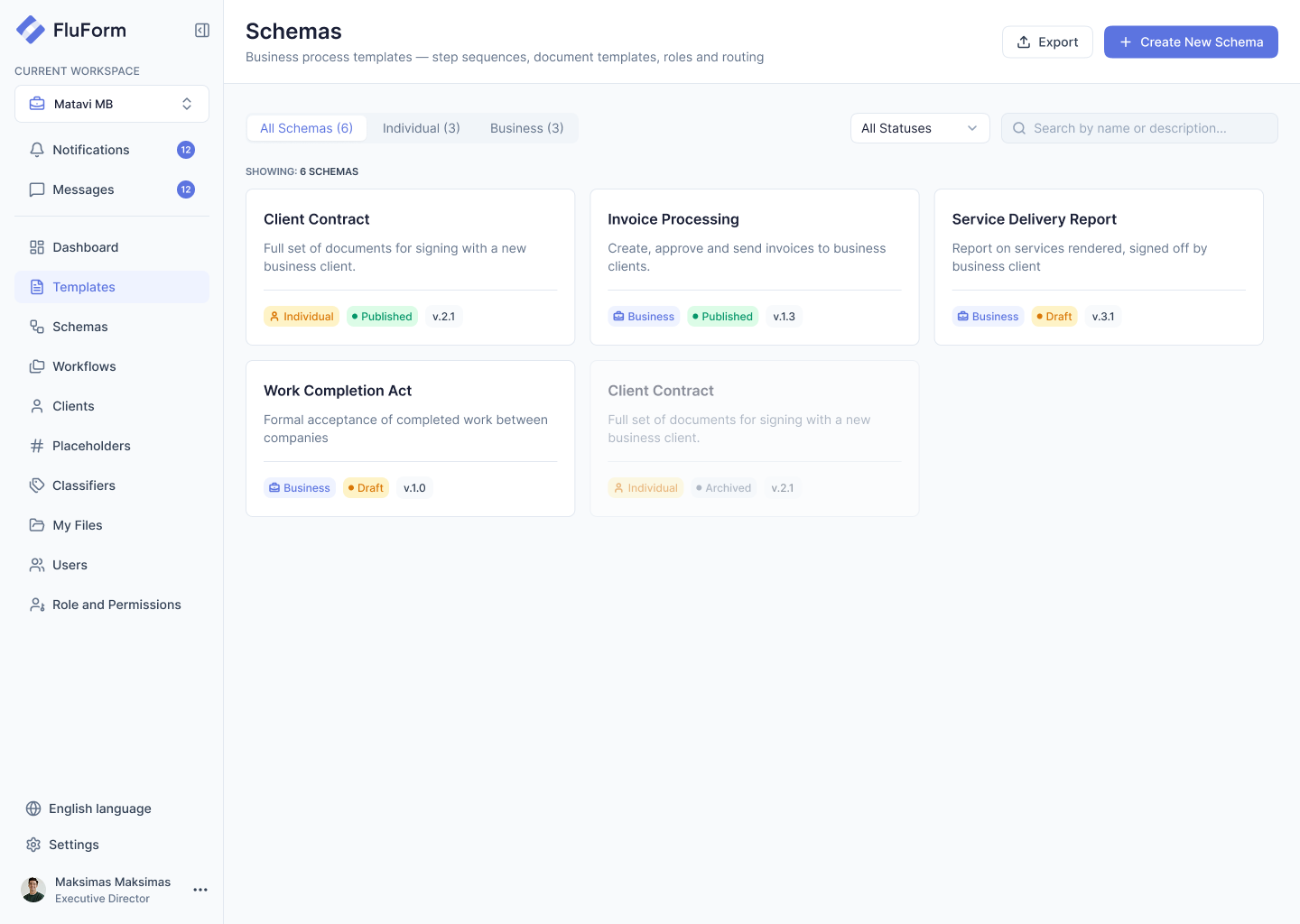
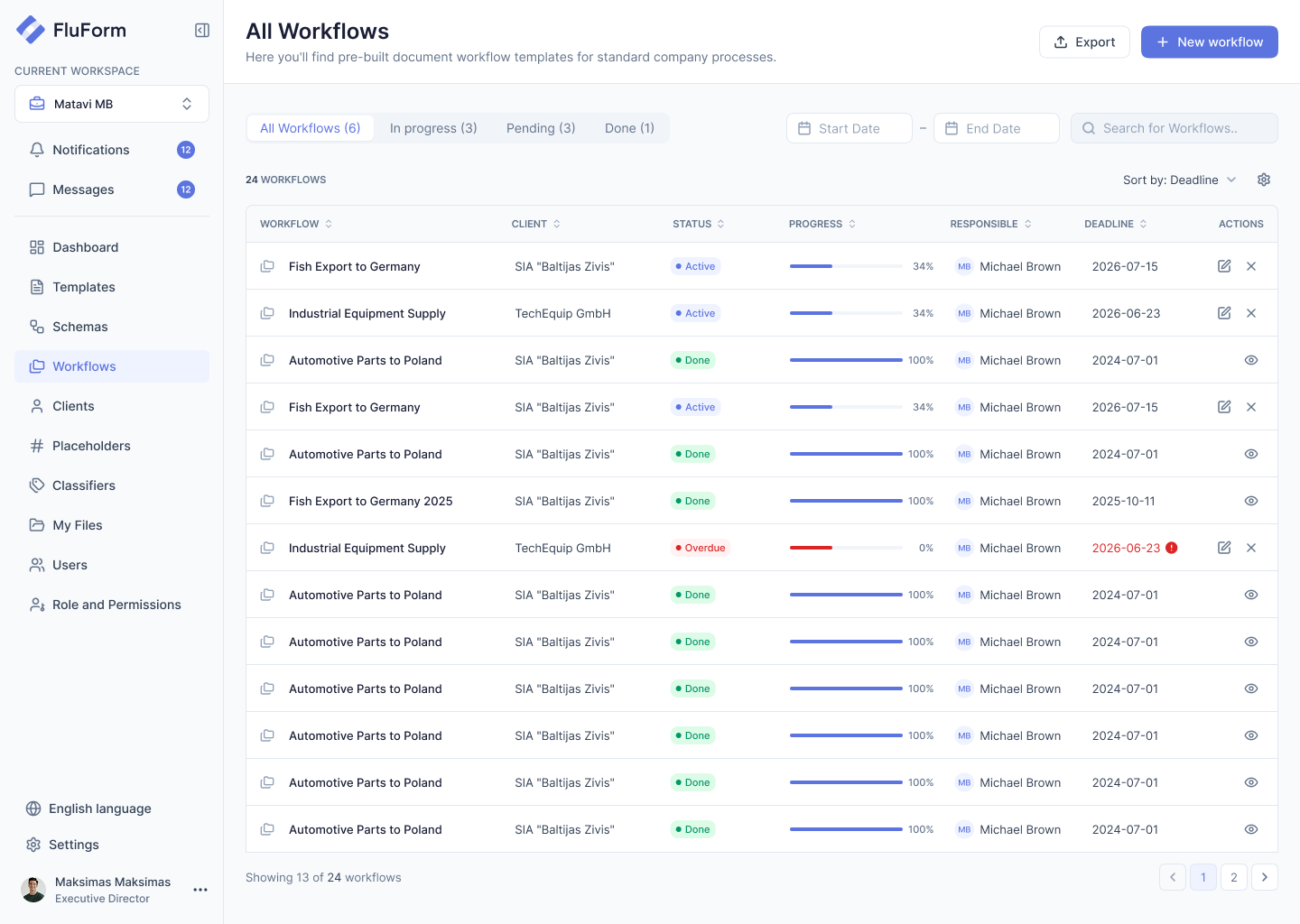
All Workflows: a table of workflows with status, progress, responsible person and deadlineNorrvikSteel frame subcontractRivala Frame SIAMTMari Tamm2026-11-14Electrical scope, Warehouse BArdent MEP OÜKSKadi Saar2026-11-22Work completion act, north wingRivala Frame SIAMTMari Tamm2026-09-30Facade glazing orderNordglass ASKIKaur Ilves2026-12-05Switchgear delivery recordArdent MEP OÜKSKadi Saar2026-09-18Variation order, level 2 slabTartu Logistics CentreJLJoonas Lepp2026-10-02Concrete supply agreementRail Concrete OÜKIKaur Ilves2026-10-09Site safety plan approvalTartu Logistics CentreMTMari Tamm2026-08-27Crane hire contractRail Concrete OÜJLJoonas Lepp2026-08-12Foundation work completion actRivala Frame SIAKSKadi Saar2026-08-04Insulation delivery recordNordglass ASKIKaur Ilves2026-07-29Scaffolding rental agreementArdent MEP OÜMTMari Tamm2026-07-15Groundworks subcontractTartu Logistics CentreJLJoonas Lepp2026-07-01
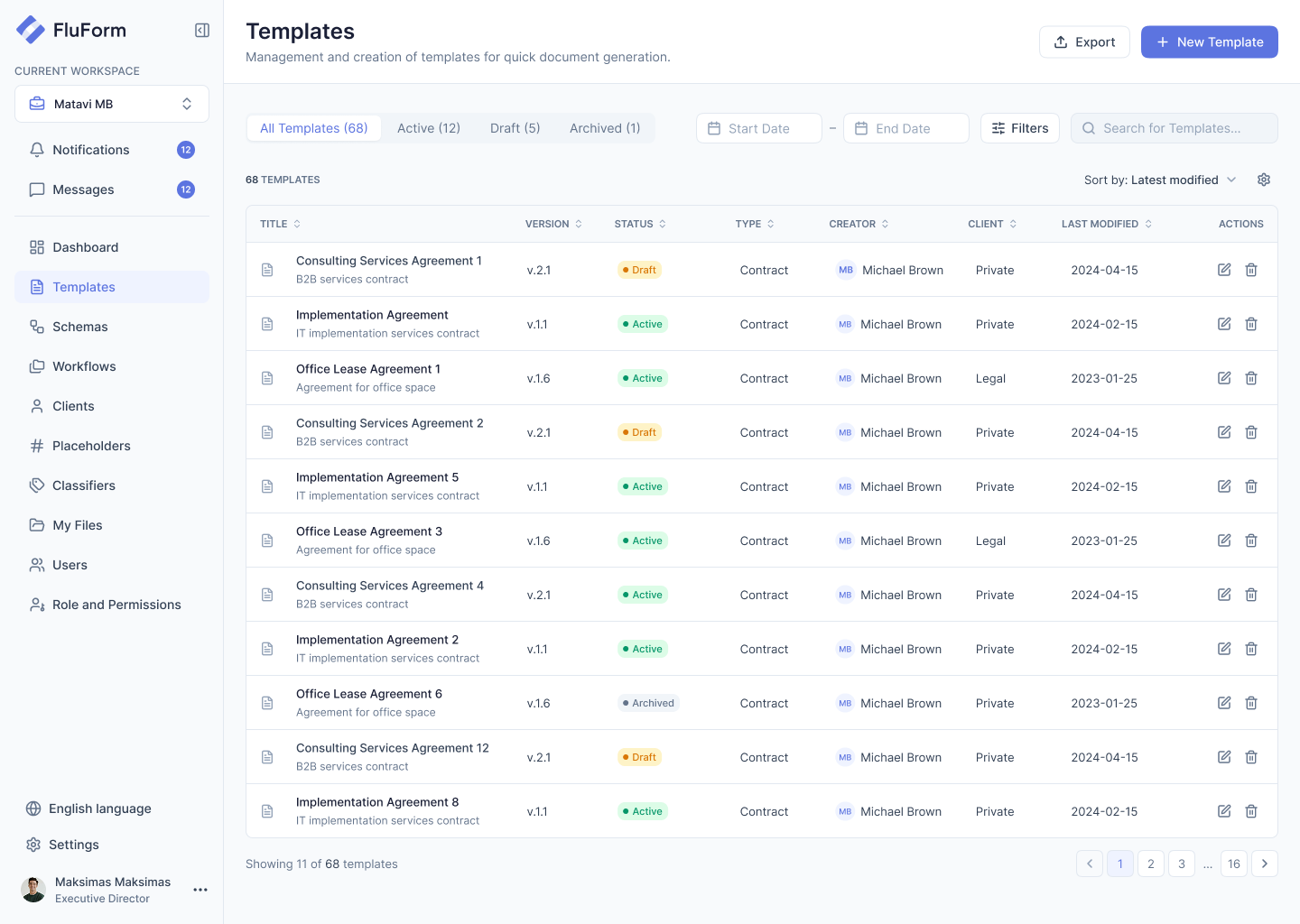
Templates: a table of document templates with version, status and typeNorrvikSubcontract AgreementWorks by a subcontractor on siteContractMTMari Tamm2026-10-15Work Completion ActAcceptance of completed worksActKSKadi Saar2026-10-12Variation OrderChange to scope, price or scheduleOrderMTMari Tamm2026-10-09Material Delivery RecordGoods received on siteRecordKIKaur Ilves2026-10-07Equipment Hire AgreementCranes, lifts and scaffoldingContractKSKadi Saar2026-09-30Site Safety PlanSafety rules for a site and its crewsPlanJLJoonas Lepp2026-09-24Supply AgreementMaterials for a construction projectContractMTMari Tamm2026-09-18Payment CertificateInterim payment for completed workCertificateKIKaur Ilves2026-09-11Subcontract Agreement 2024Previous version, kept for historyContractMTMari Tamm2024-11-20Defects NoticeDefects found during inspectionNoticeJLJoonas Lepp2026-09-02Handover CertificateHandover of a finished buildingCertificateKSKadi Saar2026-08-26
Schemas: cards of business process schemas with status and versionNorrvikSubcontract PackageSubcontract, work acts and payment certificate for a site subcontractorMaterial SupplyOrder, delivery record and invoice approval for materials on siteVariation OrderA change to scope, price or schedule, approved by project and financeWork CompletionFormal acceptance of completed works between contractor and clientSubcontract Package 2024Previous version of the package, kept for history
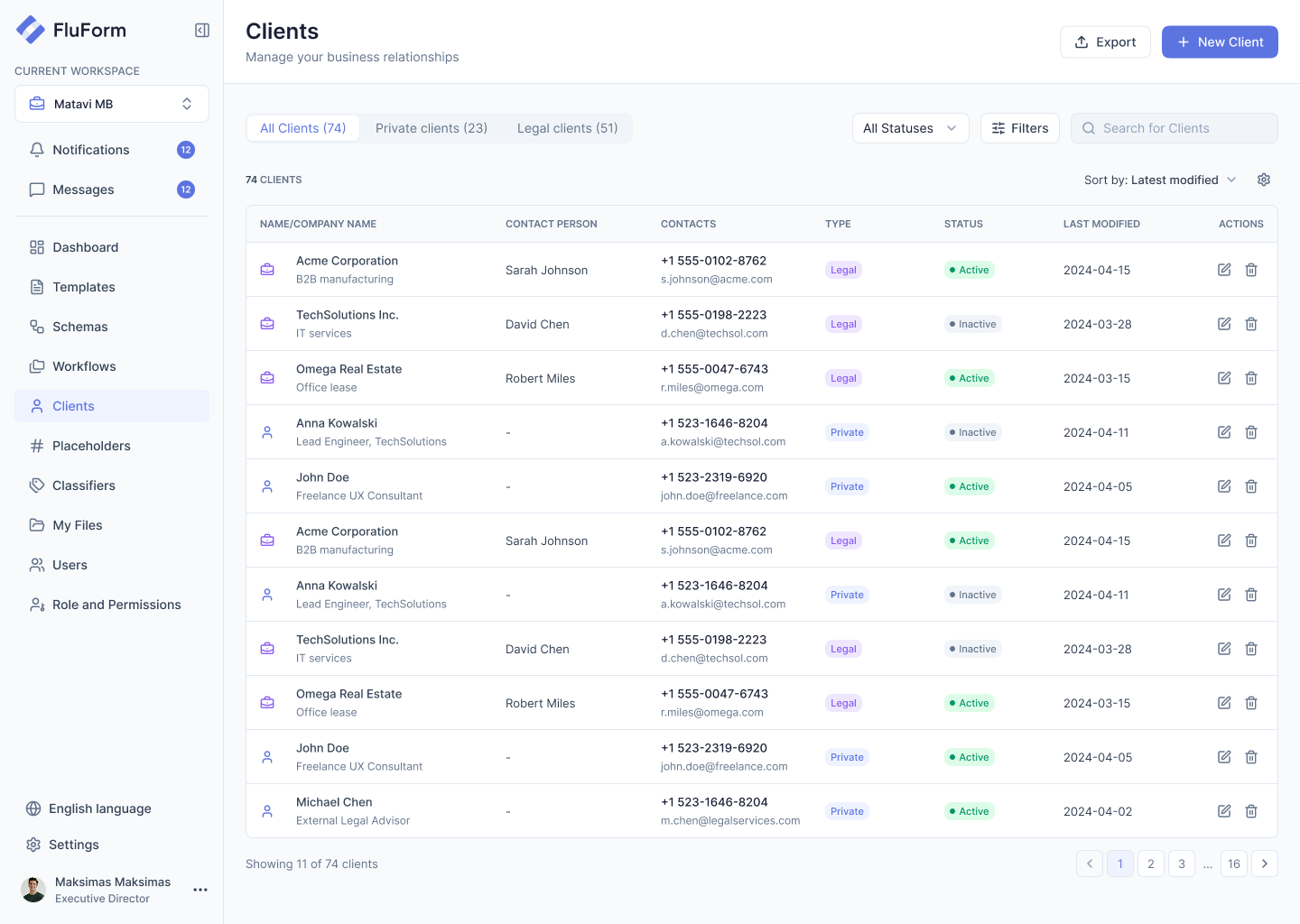
Clients: a table of clients with contacts, type and statusNorrvikRivala Frame SIASteel structures · RigaLiis Tamm+372 555 0102[email protected]2026-10-15Ardent MEP OÜElectrical and HVAC · TallinnRein Kask+372 555 0198[email protected]2026-10-12Tartu Logistics CentreWarehouse developer · TartuHelen Org+372 555 0047[email protected]2026-10-09Jaan KaskHomeowner, extension project-+372 523 1646[email protected]2026-10-07Maria LepikLandowner, site access-+372 523 2319[email protected]2026-10-03Nordglass ASFacade glazing · TallinnMarko Sepp+372 555 0231[email protected]2026-09-29Peeter SildIndependent site engineer-+372 523 4410[email protected]2026-09-24Rail Concrete OÜReady-mix concrete · PärnuAnu Mets+372 555 0377[email protected]2026-09-18Põhja Scaffolding ASScaffolding rental · TartuToomas Ruus+372 555 0412[email protected]2026-09-11Tiina MägiFreelance architect-+372 523 7788[email protected]2026-09-05Andres RebaneFreelance surveyor-+372 523 9021[email protected]2026-08-30
How it works

Set it up once and
it runs on every case

Templates and schemas are configured once. Every new hire, project or deal becomes a workflow that carries all its documents through the same route.

01 / TEMPLATE

Your Word documents,
with placeholders

A template is the Word file you already use — logo, fonts, tables and layout untouched. You mark where the data changes, and the form builds itself from those placeholders.

  • Your lawyers don’t need to relearn anything
  • A placeholder is defined once and works in every template
  • Every template carries its own version and status

WSubcontract_Agreement.docxSubcontract AgreementThis agreement is made between Norrvik andfor work atThe Subcontractor will deliverWork starts on1. Scope of workRivala Frame SIA{{client_name}}Tartu Logistics Centre{{project}}Structural steel frame{{scope_of_work}}4 March 2026{{start_date}}
02 / SCHEMA

The process,
described once

A schema is a named process — Onboarding, Permit application, Supply deal. It says which documents it covers, in what order they go, who approves and who signs.

  • One schema carries the whole package, not a single document
  • Attachments are tied to specific steps
  • Change the schema — anything already running keeps its own
Process stepsConstruction AgreementSign: Client, Legal ManagerBuilding Permit.pdfFill: ClientWatch: Project ManagerReviewReview: Legal Manager+ Add step+ Add step+ Add step+ Add stepDocumentAttachmentReviewDocumentDocumentAttachmentReviewAttachmentDocumentAttachmentReviewReviewYou
03 / WORKFLOW

One schema,
applied to one case

Starting a workflow applies the schema to a specific case — this hire, this project. Every document in the package travels the same route, and you see where each one stands.

  • Status is visible for each document separately
  • Adjust a single workflow without touching the schema
  • Full history: who created, approved and signed — and when
House constructionJaan Kask · family houseNo workflow yet+ Add workflow01FillMari TammIn progress02ReviewKadi SaarWaiting03SignKaur IlvesWaitingSchema attachedHouse ConstructionAdd workflowSchemaHouse Construction3 stepsWork Completion Act3 stepsVariation Order3 stepsHouse Construction3 stepsAttachYou
Reuse

Nobody retypes
the same data twice

Define placeholders, clients and classifiers once. From then on every form fills in what the system already knows and offers your own lists as dropdowns — no copying from the last contract.

Fields you mark in Word

Mark a spot in the template and it becomes a form field. Set it up once and use it in every template.

Counterparties, set once

Pick a client when you start a document. Name, code and address fill themselves in.

Your own reusable lists

Country, document type, department. Keep the list once and it becomes a dropdown.

Features

Everything around the document — in one place

Order and traceability that don’t depend on who’s sitting at the desk.

Roles and permissions

Build your own roles. Decide what each one can do: create, edit, approve, sign, administer.

Complete audit trail

Who did what, and when. Created, edited, approved, signed — full history for every document.

Versions that don't break anything

Documents in progress keep their version. Update a template or schema without touching them.

Live updates

No page reload. New documents, edits, signatures, and who’s in the file right now — visible immediately.

Adjust a single process

The master schema stays intact. Change steps, attachments, or assignees for one instance only.

Attachments where you need them

Attach to any step. Scans, external files, and documents from other processes. Required or optional.

Architecture

Extends to fit your needs

FluForm is built to be extended easily: connect your CRM, signature providers and API, add branching and automation as you grow.

Data source integrations

Connect external sources to placeholders: CRM, registries, internal systems. Data autofills from the API.

API-first architecture

Integrations with other systems. Start workflows externally. Generate documents via API.

Signature integrations

Electronic signature solutions from third-party providers. Different signing methods as needed.

Workflow extensions

More complex logic: branching, parallel processes. Condition-based automated decisions.

Modular placeholder system

Plug in existing data modules. Share placeholder structures across projects.

Automation

Automatic actions — for example, generating a document without manual input. Notifications and event reactions.

Security

Secure by default,
from upload to signature

What you should expect from a system that holds your contracts: encryption, limited access and daily backups.

End-to-end encryptionDocuments, passwords, access keys — encrypted at rest and in transit, always.
Two-factor authenticationAn extra layer of security. Only authorized users can access your data.
Automated backupsDaily backups and disaster recovery. Your data is always recoverable.
24/7 supportReal people, not just bots. Our team is available whenever you need us.
Who it’s for

Built for the paperwork
team handles every day

Different teams, different documents. For each one — a rule that holds without anyone watching.

Legal

Stop losing track of contracts scattered across Word files and inboxes.

  • Approved wording stays in Word
  • Form built from placeholders
  • Same review before every signing

HR

One template for offers, NDAs, and contracts — no more re-entering the same details.

  • Whole onboarding pack in one workflow
  • Hire’s details entered once
  • See which document is missing

Finance

See exactly where every approval stands, before it becomes a problem.

  • Approval history on every invoice
  • Counterparty details from the client list
  • See who holds the document

Sales

Take a proposal from draft to signed, without losing sight of what happens after.

  • Start from cleared templates
  • Terms checked before generating
  • Renewals keep their version

Construction

Attach permits, drawings, and sign-offs directly to the step that needs them.

  • Certificates tied to their subcontract
  • Scan required at its own step
  • Whole project chain in one case
FAQ

Frequently asked questions

Yes. Templates are built in Word with an add-in — with fonts, tables, layout, and branding as you’re used to. FluForm only fills in the data.

Data is stored in [region, e.g., EU]. Access is scoped by role: each user sees only what they’re allowed to. Backups are stored separately and only admins can access them.

Pricing depends on team size and process volume. We quote the exact cost after a short demo — no rough estimates.

We’ll get in touch within one working day, clarify your scenario, and show the system on it. 30 minutes, no obligation.

A basic scenario takes 1–2 weeks. Exact timing depends on the number of templates and processes; we’ll confirm after the demo.

Yes, via the open API. Workflows can be started externally, and documents generated from your system.

Nothing. Each document is tied to the template and schema version it started on. New versions apply only to new documents.

Yes — on request we provide an export of all documents and process data. We don’t build vendor lock-in.

The schema is configured visually, and a single process instance can be adjusted on the fly — without changing the master schema.

Scans, external files, appendices, and documents from other processes. Attachments can be required or optional and linked to specific steps.

Ready to run your documents
as one process?

Leave your details — we’ll get back to you within one working day and show FluForm on your scenario.

Request form
Please enter your name.
Please enter a valid email address.

Not ready for a demo? Download the PDF overview

Thanks — we'll be in touch within one working day.